Download for free
I recently created a very simple app in python for to be sure that my PC cannot go in sleep state (standby) and turn off the screen
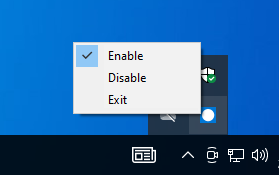
The app is really simple (code below) and have a really useful icon tray for to enable and disable it
import ctypes
import threading
import time
from PIL import Image, ImageDraw
import pystray
from pystray import MenuItem as item

# -----------------------------
# WINDOWS KEEP-AWAKE
# -----------------------------
ES_CONTINUOUS = 0x80000000
ES_SYSTEM_REQUIRED = 0x00000001
ES_DISPLAY_REQUIRED = 0x00000002

running = True
enabled = True  # state keep-awake

def set_keep_awake(enable=True):
    global enabled
    enabled = enable
    if enabled:
        ctypes.windll.kernel32.SetThreadExecutionState(
            ES_CONTINUOUS | ES_SYSTEM_REQUIRED | ES_DISPLAY_REQUIRED
        )
    else:
        ctypes.windll.kernel32.SetThreadExecutionState(ES_CONTINUOUS)

# -----------------------------
# THREAD KEEP-AWAKE
# -----------------------------
def keep_awake_thread():
    while running:
        if enabled:
            set_keep_awake(True)
        time.sleep(60)
    set_keep_awake(False)

# -----------------------------
# TRAY ICON
# -----------------------------
def create_icon_image():
    img = Image.new('RGB', (64, 64), (0, 120, 215))  # blue Windows
    d = ImageDraw.Draw(img)
    d.ellipse((8, 8, 56, 56), fill=(255, 255, 255))  # white circle
    return img

def on_enable(icon, item):
    set_keep_awake(True)

def on_disable(icon, item):
    set_keep_awake(False)

def on_exit(icon, item):
    global running
    running = False
    set_keep_awake(False)
    icon.stop()

def start_tray():
    # In pystray, 'checked' lambda function for True/False
    enable_item = item('Enable', on_enable, checked=lambda item: enabled)
    disable_item = item('Disable', on_disable, checked=lambda item: not enabled)
    exit_item = item('Exit', on_exit)

    menu = (enable_item, disable_item, exit_item)
    icon = pystray.Icon("KeepAwake", create_icon_image(), "Keep Awake", menu)
    icon.run()

# -----------------------------
# MAIN
# -----------------------------
if __name__ == "__main__":
    t = threading.Thread(target=keep_awake_thread, daemon=True)
    t.start()
    start_tray()
You need to install pystray and pillow
pip install pillow
pip install pystray
Than we can make a standalone application executable from the code
pip install pyinstaller
pyinstaller --onefile --windowed keepawake.py
Leave a Reply